AI Product Photoshoot
A product photoshoot, without booking a studio
Upload the product photos you already have on your phone. Generate white-background main images and lifestyle scenes in bulk, close to a real photoshoot but without renting a studio, hiring a model, or sourcing props. Compare every result with the original and export only what you approve.
FaFaFa AI Workspace
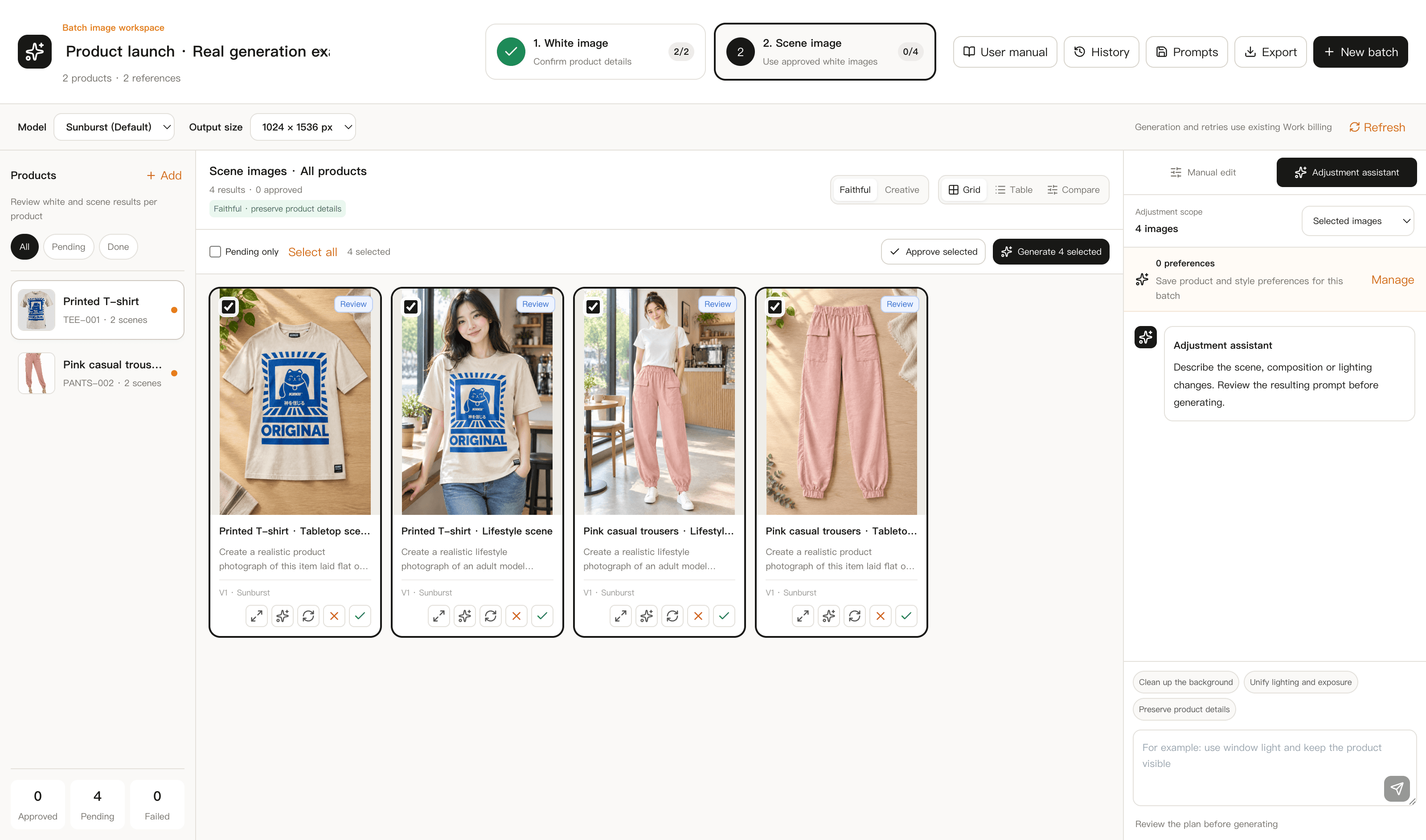
Scenes are generated from an approved white background
Lock in the product's appearance first, then build scenes from it, so the product doesn't drift in shape or material.
What is an AI product photoshoot
It is not a filter on your original photo. A generative model rebuilds how the product looks on a white background and in a scene, while keeping its color, shape, and material close to the source photo.
Generate white-background and scene images from phone photos, no props or location needed
Scenes are built from an approved white-background image, so the product stays consistent
Zoom in and compare every result with the original; retry or edit the prompt when it's off
Two stages, checked at each step
White-background images confirm the product itself. Scene images add the setting and lifestyle feel on top of that.
01
White-background main image
A clean, centered product view. Check color, shape, and details against the original before moving on.
02
Scene image
Generated from an approved white-background image, keeping proportions and materials close to a real photoshoot.
03
Review and rework
Compare the original and the result side by side. Retry or adjust the prompt for any image that doesn't hold up, and keep earlier versions.
Four steps to an AI product photoshoot
- 1
Import your photos
Upload original and reference photos per product, add a name and SKU, and choose a model and size.
- 2
Approve the white background
Generate the main image first and compare it closely with the original before approving it.
- 3
Generate the scene
Build the scene from the approved white-background image, adjusting the prompt to match your audience.
- 4
Export by SKU
Download approved images named by product or SKU. Cloud files stay available for about 2 days.
When this fits your workflow
New listings without a studio
When all you have is a phone photo, generate a white-background main image and scenes to fill the listing.
Lifestyle shots without a model
Need a lifestyle feel on the detail page but have no model or props? Scene images cover that gap.
Different specs per marketplace
Generate separate image sets for Amazon, Shopify, or Etsy from the same product.
Outsourced retouching takes too long
Use generated results to ship on time, then decide if a batch needs manual retouching later.
AI product photoshoot FAQ
Can the scene image include a model?+
Scene generation focuses on the product in a setting. Results with a human model depend on the specific prompt, so test one image before generating a full batch.
How is this different from a generic background changer?+
Swapping only the background often distorts edges or materials. FaFaFa AI approves the white-background image first, confirming the product hasn't shifted, before generating the scene from it.
Can I try it for free?+
New accounts start with initial credits, enough to test a few images before buying more for a full batch.
Are the results ready for Amazon or Shopify?+
White-background images follow common marketplace main-image rules, and scenes are meant for detail pages. Check your target marketplace's current rules before listing.
Test it with one product photo
Sign in and import one photo to run the full white-background and scene workflow.